


Keeping Sensitive Computer Hardware Free From Dust and Grime
Dust accumulation inside desktop towers, fan vents, and mechanical keyboard switches can trap heat and degrade hardware performance over time. While household utility cleaners work well for floors, using a standard floor machine near sensitive electronic components risks electrostatic discharge and physical damage. Identifying the best vacuum for pc maintenance requires focusing on specialized tools designed for tight clearances, manageable airflow, and safe debris collection. Compact designs with brushless motor technology and dedicated micro attachments help pull crumbs out of keycaps without damaging delicate circuits.
Unlike managing large living spaces with a cordless vacuum with 2 batteries, cleaning computer components calls for precision airflow rather than massive floor heads. Selecting the right setup involves balancing cordless USB portability against high-output corded designs that feature ESD-safe certification. Our evaluation examines listed manufacturer specifications, suction ratings, battery runtimes, and included nozzles across popular models to help you select the ideal cleaner for your desk setup. Many options also integrate reverse blower modes to dislodge stubborn debris from heatsinks before vacuuming it away.




Frequently Asked Questions
Can I use a standard household vacuum to clean my computer?
Standard household vacuums are generally unsafe for internal computer components because their plastic nozzles can generate static electricity. Using a household machine like a Shark Navigator Lift Away Speed vacuum is great for room carpeting, but sensitive microchips require ESD-safe tools or dedicated mini electronics vacuums. Static buildup can easily shock and ruin a motherboard or graphics card. Specialized PC cleaners often use grounded materials, conductive hoses, or smaller low-voltage motors to minimize electrical discharge risks.
What is the benefit of a 2-in-1 vacuum and blower for PC maintenance?
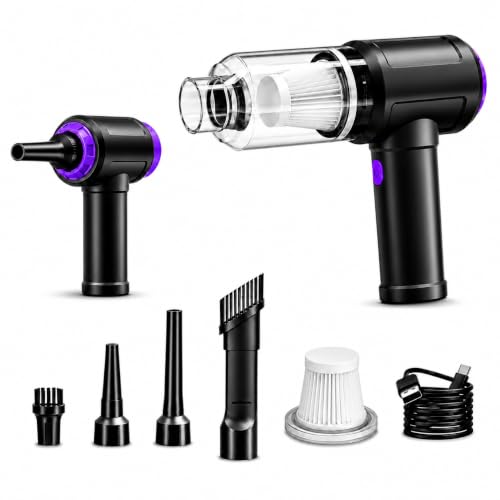
A 2-in-1 device allows you to dislodge stubborn grime with forced air before suctioning the loose particles away. High-RPM blowers push dust out from tightly packed radiator fins and deep keyboard key switches. Switching to vacuum mode immediately captures the airborne debris in a dust cup so it does not settle elsewhere in your room. This dual action provides a practical alternative to buying disposable canned air.
Why is ESD safety important when cleaning computer components?
Electrostatic discharge safety prevents static voltage from arcing to delicate electronics and causing permanent circuit failure. Fast-moving air and plastic nozzles naturally generate static friction as dry air passes through them. Dedicated computer vacuums, such as grounded corded units, utilize anti-static wrist straps and conductive plastic parts to safely route electrical charges away from sensitive parts.
How often should you clean dust out of a desktop PC?
Cleaning your PC tower every three to six months helps maintain proper cooling airflow and prevents fan failure. Environments with pets or plush carpeting may require monthly attention to keep intake filters clear of hair and dust bunnies. Neglecting routine maintenance can cause dust blankets to form over heatsinks, which forces fans to spin faster and generates higher operating temperatures.
Are cordless USB electric air dusters powerful enough for PC keyboards?
Cordless electric dusters typically deliver between 110,000 and 320,000 RPM, providing plenty of airflow for dislodging keyboard debris. These compact battery-powered devices replace recurring costs associated with disposable aerosol cans while avoiding moisture discharge. Their included narrow nozzles and gentle brush attachments direct concentrated airflow between keycaps to clear crumbs and pet hair effectively.
Can washable HEPA filters in mini PC vacuums be reused immediately?
Washable filters must be completely air-dried before reinstallation to prevent moisture from entering the motor or electronics. Rinsing a high-density filter clears trapped fine particulate matter, but running a vacuum with a damp filter can cause electrical shorts or motor damage. Manufacturers advise letting the filter dry thoroughly in a well-ventilated area before your next cleaning session.





Write Your Review
No reviews yet. Be the first to share your experience!