


Workbench debris, patio leaves, and hidden electronics dust often call for high-velocity air rather than straight suction. While standard vacuums pull air inward to trap dirt, many cleaning setups can redirect motor exhaust outward to dislodge stubborn particles from tight recesses. Learning how to use a vacuum cleaner as a blower allows you to tackle clearing tasks around the garage, workshop, or home office without needing a dedicated compressor. Connecting the hose properly transforms routine equipment into a capable utility tool for blowing debris out of corners, radiators, and tool bays.
Many utility canisters and specialized electric dusters feature a dedicated blower port, whereas standard upright units lack an external exhaust outlet. Attempting to reverse airflow on an incompatible machine can strain the motor or spread fine dust across the room. Smaller portable models or dedicated handheld vacuums for kitchen cleanup often rely on specialized ducting or high-speed brushless motors to handle dual-purpose tasks safely. Understanding how exhaust airflow works, inspecting filtration barriers, and using narrow nozzle attachments ensure you get effective blowing performance while protecting your vacuum motor from overheating.


Operating a Vacuum Cleaner in Blower Mode
A standard vacuum cleaner relies on an electric motor to spin an impeller fan, creating a pressure drop that draws air and debris into the collection chamber. Because the air entering the machine must also exit, every vacuum produces an exhaust stream with velocity equivalent to its intake volume. Operating a vacuum as a blower simply requires redirecting this exhaust stream through a hose or nozzle assembly rather than letting it diffuse into the room. When configured properly, this air stream provides substantial force for dislodging trapped dirt, clearing shop surfaces, or blowing dust out of tight spaces.
Airflow Mechanics and Exhaust Redirection
Every motorized vacuum cleaner operates on a continuous airflow loop driven by internal pressure differentials. The intake port pulls air, dust, and loose particles across a floorhead or wand, funneling that mixture through a filtration barrier. Once particulate matter separates into a bag or dirt cup, clean air routes across or around the motor housing to provide cooling before exiting. This expelled air carries significant kinetic energy that can match or exceed the suction velocity observed at the tool tip.
The main challenge in utilizing this airflow is capturing it without restricting motor ventilation. In a suction configuration, the vacuum relies on a wide intake channel that gradually narrows toward the hose and wand. Reversing that process forces high-volume exhaust through a smaller aperture, which naturally increases velocity while elevating backpressure. If a machine lacks an engineered exhaust port, attempting to force the air through narrow gaps can create internal turbulence that reduces motor efficiency.
Identifying Vacuums with Dedicated Blower Ports
Not all cleaning machines can operate as blowers, so identifying built-in exhaust connectivity is the first essential step. Many utility wet/dry shop vacuums feature two distinct exterior ports on opposite sides of the motor head. The front port serves as the standard suction intake, while the rear or side port discharges pressurized exhaust through a friction-fit collar. Connecting a standard utility hose to that dedicated rear collar instantly converts the machine into a functional workshop blower.
Canister vacuums from certain commercial or utility product lines also incorporate exhaust ports designed for push-on hose fittings. In contrast, modern domestic upright and stick vacuums almost always diffuse their exhaust across broad acoustic baffles and sealed post-motor filters. These domestic designs do not support hose redirection because their exhaust pathways are integrated directly into the body chassis. Specialized dual-function units, such as the METROVAC DataVac MDV-1BA Pro Series Computer, solve this dilemma by providing dedicated blower options directly on their compact steel housings.
Step-by-Step Procedure for Converting a Compatible Vacuum
Before attempting to configure any vacuum for blower operation, you must disconnect the power cord from the wall outlet or verify that cordless power switches are locked off. Safety begins with ensuring that the electrical supply is completely interrupted before manipulating motor ports or internal chambers. Next, you must thoroughly inspect and empty the dust canister, collection bag, or utility drum. Operating a blower with residual dirt in the collection system risks blasting accumulated grime across your work area at high speed.
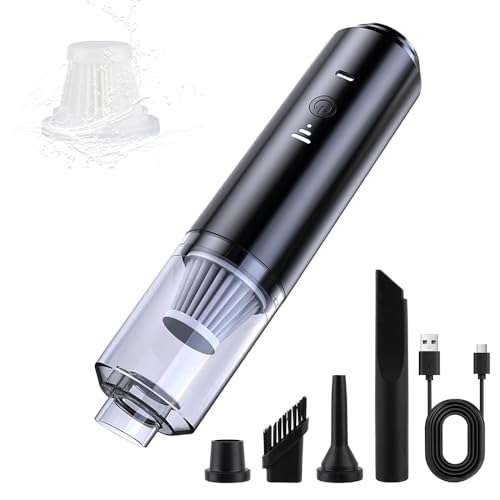
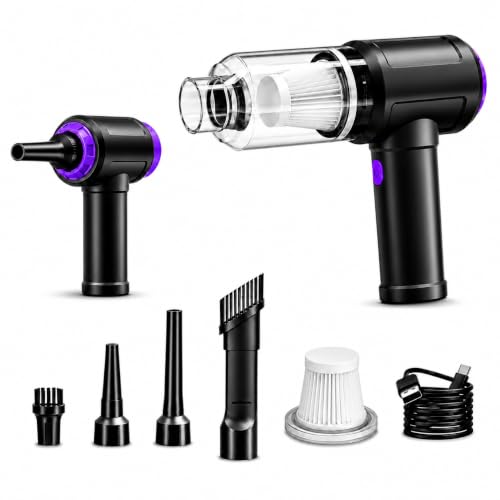
Once the collection bin is clean, inspect the internal filters to ensure they are seated securely and completely dry. Operating without a filter can allow stray debris to strike the high-speed fan blades, potentially cracking plastic impellers or causing motor stall. Locate the designated exhaust port on the vacuum housing, insert the hose cuff, and twist or latch it firmly into place. If you are using a compact multi-nozzle tool like the IFTHFOUR Computer Vacuum Cleaner Cordless, attach the dedicated blow nozzle to the designated rear air outlet while keeping the front suction inlet clear.
Position the vacuum on a stable surface where vibration will not tip the unit over during operation. Point the hose nozzle toward an open, safe target area before toggling the power switch. Turn on the motor and let the airflow stabilize for several seconds while checking for unusual sounds, burning odors, or loose hose connections. Move the nozzle systematically across the target surface, keeping the tip a few inches away from delicate items to prevent impact damage from the pressurized air.
Managing Motor Backpressure and Overheating Risks
Electric vacuum motors depend on continuous, unrestricted airflow to dissipate heat generated by electrical resistance and magnetic friction. When you use a vacuum as a blower, attaching narrow nozzles can restrict airflow volume and generate significant backpressure against the impeller. If the air cannot escape quickly enough, internal operating temperatures rise rapidly and can trigger thermal overload cutoffs. Running a restricted blower continuously for extended periods poses a genuine risk of melting plastic housings or degrading motor windings.
To prevent overheating, monitor the temperature of the exhaust air and the exterior motor casing during use. Take frequent breaks during extensive cleaning tasks, allowing the motor to idle with an open nozzle or cool down completely between blowing cycles. Never obstruct the primary intake port while operating in blower mode, as blocking the intake starves the fan of air entirely. Without incoming air, the impeller spins in a partial vacuum, eliminating cooling airflow and subjecting the motor to extreme thermal stress within minutes.
Avoiding Accidental Dust Ejection During Startup

The most common error when converting a standard vacuum to blower mode is failing to clean the interior airflow path before powering on. Residual fine dust trapped in the hose ribs, filter pleats, or exhaust ducting will instantly eject in a dense cloud when airflow reverses. This airborne dust cloud settles over freshly cleaned surfaces and poses an inhalation hazard for anyone nearby. Anyone dealing with delicate environments or considering handheld vacuums for mattress cleaning knows how critical clean airflow pathways are for preventing airborne contamination.
To prevent dust ejection, flush the vacuum hose with clean water and let it dry completely before attaching it to the exhaust port, or use a dedicated clean blower hose. Always tap out the pre-motor filter and install a fresh collection bag or thoroughly scrubbed dust cup prior to blower conversion. Run the machine outdoors or in an open garage for thirty seconds before bringing it near delicate items, workbenches, or vehicle interiors. This brief purge cycle expels any loose internal particulates away from living quarters or sensitive equipment.
Static Electricity Risks When Cleaning Electronics
High-velocity air passing through plastic hoses and synthetic nozzles generates friction that naturally builds static electrical charges. When blowing dust out of computer towers, circuit boards, or stereo amplifiers, an electrostatic discharge can permanently damage delicate semiconductors. Standard plastic utility vacuum hoses are notorious for accumulating high static voltages, especially in low-humidity environments. Using a generic utility vacuum with an ungrounded plastic nozzle on a sensitive motherboard introduces severe operational risks.
Specialized electronics equipment addresses static concerns through deliberate material selection and grounding designs. The METROVAC DataVac MDV-1BA Pro Series Computer features an all-steel construction and grounded components specifically engineered to mitigate static buildup around sensitive circuitry. When working around computing hardware, use specialized antistatic tools and avoid rubbing plastic nozzles directly against circuit traces. Keep the nozzle suspended several inches above the components, relying on air velocity rather than physical contact to dislodge debris.
Selecting Nozzles and Attachments for Air Velocity
The effectiveness of a vacuum blower depends directly on the nozzle attached to the working end of the hose. Wide floor nozzles diffuse air velocity across too broad an area, leaving the stream weak and ineffective for shifting seated dirt. Narrow crevice tools, tapered concentrator nozzles, and air pin pointers compress the exhaust stream into a dense, high-speed jet capable of dislodging stubborn grime. Specialized kits often include micro-cleaning wands and soft-bristle brushes designed to sweep dust loose while the air stream blows it clear.
Multi-functional micro cleaners showcase how attachment variety expands utility in tight workspaces. The 14.5KPA Computer Keyboard Vacuum Cleaner by Goweto pairs an 80W brushless motor delivering 110,000 RPM airflow with specialized blow tubes and brush nozzles to clean keyboard keycaps and CPU fans. Similarly, the IFTHFOUR Computer Vacuum Cleaner Cordless includes four task-specific attachments, including a dedicated blow nozzle for keyboards and vents alongside traditional crevice tubes. Matching the nozzle opening to the target surface ensures adequate air velocity without unnecessarily choking motor exhaust volume.
Practical Applications for Vacuum Blower Mode
Operating a vacuum as a blower proves exceptionally useful across a variety of household, workshop, and automotive maintenance chores. In workshops, a directed blast of air clears sawdust, metal filings, and shavings from table saw tracks, drill press bases, and workbench corners far faster than sweeping. Outside the home, a utility vacuum blower quickly clears dry leaves, pine needles, and grass clippings from garage thresholds, entry steps, and covered patios. It also provides a convenient method for inflating air mattresses, pool floats, and camping gear when paired with tapered adapter cones.
Vehicle interior detailing is another practical use case where blowing air complements traditional suction. Directed air streams force deeply embedded sand, crumbs, and pet hair out of seat crevices, seat slider tracks, and dashboard climate control vents where rigid vacuum nozzles cannot reach. While households often rely on full-size home vacuum cleaners for routine floor care, having a portable blower function bridges the gap for tight detailing jobs. Blowing out debris first allows you to sweep or vacuum it up easily once it lands on open floor mats.
Comparing Dedicated Dual-Function Units with Standard Utility Vacuums
Choosing between a full-size utility vacuum and a compact dual-function cleaner depends on the scale of your tasks and mobility requirements. Full-size wet/dry shop vacuums offer substantial air volume and large hose diameters, making them ideal for bulky yard debris and workshop floors. However, their sheer weight, stiff hoses, and loud operating noise make them cumbersome for delicate desktop tasks or quick electronic cleaning. Standard shop vacuums also require substantial storage space and must be plugged into high-current wall circuits.
Compact dual-function tools prioritize maneuverability and precise air delivery for delicate applications. Cordless rechargeable models like the IFTHFOUR and Goweto units provide one-handed operation and USB charging versatility, running without cumbersome cords around desks, sewing machines, and car consoles. Corded steel units like the METROVAC DataVac MDV-1BA deliver sustained 120-volt motor power for intensive electronics dusting without battery runtime constraints. Matching the tool format to your intended environment guarantees effective air movement without physical awkwardness or unnecessary motor strain.
Reversing the Setup and Performing Post-Operation Maintenance
After completing your blowing tasks, returning the vacuum to standard suction mode requires a brief inspection procedure. Turn off the power switch, unplug the unit from the wall, and allow the motor housing to cool down to ambient temperature. Detach the blower hose and inspect the exhaust collar for any dust buildup or particulate accumulation that may have gathered around the port. Wipe the exterior port clean with a dry microfiber cloth before reinstalling any protective covers, exhaust diffusers, or post-motor filters.
When reconnecting the vacuum for suction tasks, ensure that all internal filters, collection bags, and seals are correctly repositioned in their working seats. Washable filters, such as those found on compact rechargeable units, should be inspected for dust loading and allowed to air dry completely if rinsed before reinstallation. Verify that the hose locks firmly into the primary intake port without air leaks around the collar gasket. Taking these simple restoration steps protects your equipment from motor damage and ensures dependable cleaning performance across both suction and blowing modes.


Write Your Review
No reviews yet. Be the first to share your experience!