


Keeping Delicate Electronics Free from Dust and Debris
Dust buildup inside desktop cases and keyboard switches can degrade performance, trap heat, and cause sticky keystrokes. While full-sized vacuums clean household floors, sensitive electronics require focused airflow and compact tools that reach into narrow crevices without damaging parts. The best computer vacuum duster helps you clear debris from PC towers, consoles, and desks without relying on disposable canned air that can freeze or spray moisture. If your home cleaning routine already includes a cordless vacuum with 2 batteries for floors, adding a dedicated compact blower keeps your workspace equally neat.
Manufacturers offer options ranging from high-speed air blowers to versatile two-in-one vacuum cleaners with washable HEPA filters. Our comparison evaluates listed motor specifications, battery runtimes, included nozzles, and manufacturer details to highlight models suited for delicate hardware. Some units provide cyclone suction for collecting loose crumbs, while others generate concentrated airflow up to 110,000 RPM or higher to blast lint from radiator fans. Reviewing these manufacturer-stated features allows you to match the right tool to your electronic maintenance routine.


Frequently Asked Questions
Can an electric air duster replace disposable canned air for PC cleaning?
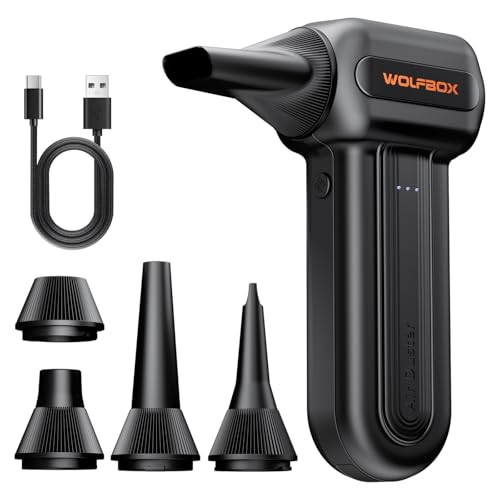
Electric air dusters effectively replace disposable canned air for ongoing PC cleaning. Disposable cans lose pressure quickly and can spray cold liquid propellant when inverted. Electric models use high-speed brushless motors to deliver continuous airflow across multiple power settings without freezing up. They recharge through standard USB ports, making them a cost-effective alternative for frequent tech maintenance.
What is the difference between an air duster and a computer vacuum?
An air duster blows air outward to dislodge debris, while a computer vacuum suctions dirt into an internal container. Blowers dislodge stubborn grit, lint, and pet hair trapped behind fans or deep inside keyboard switches. Mini vacuums collect loose particles directly so they do not settle elsewhere on your desk. Dual-function units offer both blowing and suction ports for flexible debris management.
Are mini computer vacuums safe for delicate electronic components?
Mini computer vacuums are safe when used with appropriate brush attachments on non-static surfaces. Soft brushes help sweep debris from heatsinks and fan blades while moderating suction contact. For floor-level dust near your desk setup, pairing small tools with a cordless stick vacuum with removable battery keeps the entire room clean. Always power down hardware before vacuuming near computer circuits.
How long do cordless electric dusters run on a single battery charge?
Battery runtime depends on the selected speed setting and overall battery capacity. Manufacturer specifications indicate that low-speed settings for light dusting can run between 90 and 240 minutes. Operating high-speed turbo modes draws significantly more power, shortening operating duration to focused cleaning sessions. Most units take roughly 2.5 to 4 hours to recharge fully using standard USB Type-C cables.
How do you clean the filters on small computer vacuums?
Filter maintenance involves emptying the dust container and rinsing the washable filter with cool water. Many mini vacuums feature reusable filters that meet HEPA standards to capture fine dust particles. Manufacturers recommend allowing the washed filter to air dry completely before reinserting it into the device. Keeping the filter clean preserves suction strength and prevents motor strain during electronics maintenance.




Write Your Review
No reviews yet. Be the first to share your experience!